
Instruction Methods

When I took Computer Science classes in college, all of my professors lectured while I took notes or followed along in the textbook. If this is how you learned Computer Science, then lecturing might seem like the most natural way to teach your classes.
In your first year teaching Computer Science, you will likely have three or four (or more!) different courses to prepare for, so it is understandable that you may start out with a lecture approach.
However, there are many different ways to engage students in Computer Science instruction. As you get a feel for the content in all of your classes, implement some of the other instruction methods described below.
Lecture
I always found that I learned a lot when preparing for a lecture, and I felt really confident with the topic after giving the lecture or demonstration three or four times. And this makes sense because I was the one doing all of the work!
I also found that my students understood the least when the instruction method I chose was a lecture followed by a programming assignment.
In your first year teaching Computer Science, you will likely have three or four (or more!) different courses to prepare for, so it is understandable that you may start out with a lecture approach.
However, there are many different ways to engage students in Computer Science instruction. As you get a feel for the content in all of your classes, implement some of the other instruction methods described below.
Lecture
- Teacher lectures or demonstrates a programming concept using the computer, document camera, interactive whiteboard, or dry erase board
- Students listen, watch, take notes, for follow along with a handout or textbook
- Teacher and students may ask and respond to questions
I always found that I learned a lot when preparing for a lecture, and I felt really confident with the topic after giving the lecture or demonstration three or four times. And this makes sense because I was the one doing all of the work!
I also found that my students understood the least when the instruction method I chose was a lecture followed by a programming assignment.

|
Manipulatives, Toys, and Stories
When I started using manipulatives, such as toys, boxes, and egg cartons, to explain programming concepts, I could tell that students were making better connections to the topic. The manipulative gave them a visual representation of the programming concept. I encourage you to use manipulatives when teaching Java. Try to have enough of each manipulative so that every student or pair of students can have one. I also read my students Dr. Seuss stories that related to programming concepts. My high school students were genuinely excited, and they remembered the stories' connections to programming. Teaching Computer Science Using Toys Google Drive folder: Ideas for using manipulatives, toys, and stories, as well as more student involvement activities |
|
Type-Along
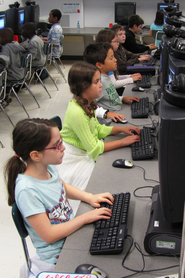
Type-alongs helped my students develop problem-solving skills as they heard other students describing aloud why a piece of code generated an error and how to fix it. These activities created community in my classroom, as well. Computer Science classes can be very isolating, and through type-alongs, students began to view programming as a was to learn with and from classmates. |
|
Partner Practice
Pair Programming
When students are working in groups, I think every teacher is worried at one time or another about whether students are cheating or whether one group member isn't pulling his or her weight. It can be argued that every students should be able to demonstrate every concept on his or her own in order to complete the course.
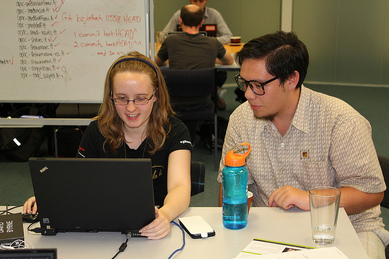
However, along the way, I found that partner practice and pair programming were incredibly effective ways for students to learn with and from each other. Students were more confident about their programming ability, perhaps because their ideas were being validated by a peer. Students had <gasp> fun debugging their programs with a partner. Working with a partner is not a motivator for all students, but it is a great instruction method to include in your classroom repertoire.
- Create a fill-in-the-blank program. Blanks are put in place of important keywords.
- Students work in pairs to complete the program on paper. Students are allowed to use their notes and example programs to help fill in the blanks.
- Circulate as pairs are working to check each pair’s level of understanding.
- When everyone has finished, fill in the blanks together.
Pair Programming
- Students work in pairs to complete a programming assignment.
When students are working in groups, I think every teacher is worried at one time or another about whether students are cheating or whether one group member isn't pulling his or her weight. It can be argued that every students should be able to demonstrate every concept on his or her own in order to complete the course.
However, along the way, I found that partner practice and pair programming were incredibly effective ways for students to learn with and from each other. Students were more confident about their programming ability, perhaps because their ideas were being validated by a peer. Students had <gasp> fun debugging their programs with a partner. Working with a partner is not a motivator for all students, but it is a great instruction method to include in your classroom repertoire.
- Tips for Pair Programming, from CS Teaching Tips
- How to use Pair Programming video by Code.org

|
Flipped Classroom
See the Flipped Classroom page of this site for more information about flipping some of your Computer Science content. |
Peer Instruction
- Practice: Peer Instruction - Rochester Institute of Technology Teaching & Learning Services
Process Oriented Guided Inquiry Learning
- CS-POGIL Process Oriented Guided Inquiry Learning in Computer Science + Overview & Sample Activity presentation by Clif Kussmaul & Tammy Pirmann
- POGIL-CSP Community of Practice
